Medical Billing Software Patient Payment Fees: Compare Statements and Processing

Compare medical billing software patient payment fees by separating the tools your staff uses from the charges for sending statements and processing payments. A portal, a mailed statement and a card transaction can have different pricing conditions. Ask software companies to identify the functions, billing units and support included, then compare the complete cost against the way your practice handles patient balances.
Compare medical billing software prices for your practice. Describe the billing tools, current systems and support your team needs to make the software comparison useful.
Compare patient statement tools and billing units
Describe how the practice currently prepares and sends statements. Include electronic delivery, mailed items and any work your staff performs before release. Ask the software company which options belong in the proposed package and what creates a charge. Discuss a repeated statement or another ordinary event in your workflow so the counting rules are clear. Keep the amount and unit together when comparing proposals. This gives the practice a practical description of the service it will use and helps it identify charges that may sit outside the base software subscription.
Ready to explore software options? Compare Software Prices with the required billing work and current systems in the same request. Keep the proposed package and charging basis together when reviewing company responses.
Compare card-processing charges with software subscription costs
Ask which company provides payment processing under the proposed arrangement and how the charging schedule works. Request the applicable percentage, fixed transaction component and any program or equipment amounts. Discuss the payment channels your practice intends to use. Keep software access and processing services identifiable even when they are presented together. Your comparison should explain the proposed transaction price and the activity it applies to, with a current schedule that staff can use for the estimate. A general statement that payments are integrated does not replace that complete pricing description.
Compare patient payment features using named package details
DrChrono publishes separate statement and integrated-payment fee notes in its pricing information. CollaborateMD describes patient-payment and statement functions alongside its software packages. These are useful starting points for questions about the actual version your practice would purchase. Review the internal profiles, then request the package, relevant channels and current charges for your requirement. Keep eligibility, activation and optional-service details with the response. The company comparison should show which tools staff receive, how the payment relationship operates and which amounts belong in the budget for the proposed workflow.
For the related buying decision, explore medical billing software pricing. Then compare medical billing software companies and prices using a consistent description of the practice and the work you want the software to support.
Compare payment fees using a clearly labelled example
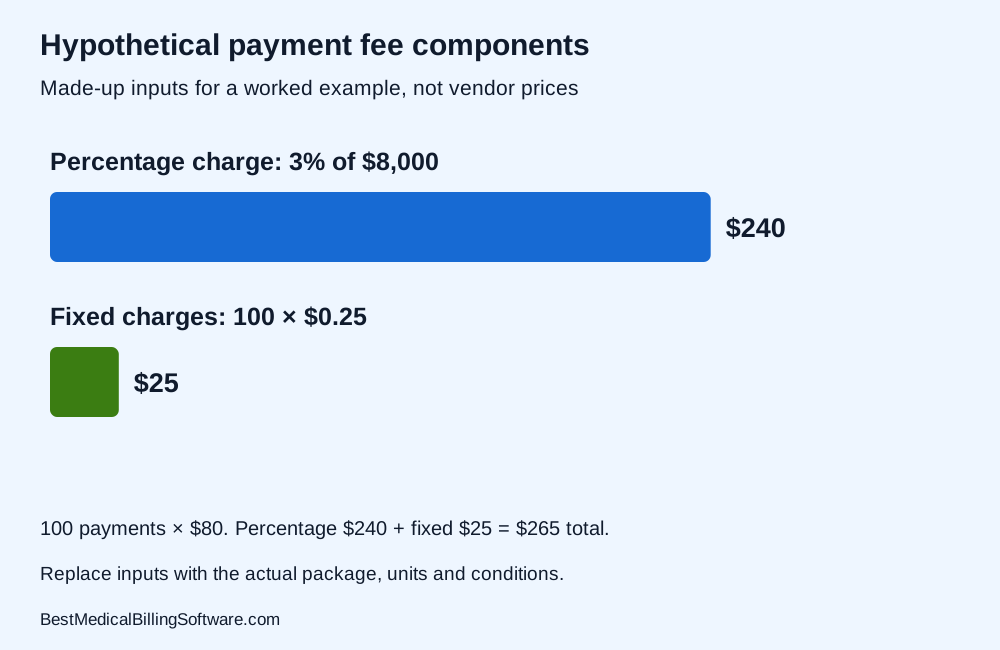
For illustration only, suppose a fictional processing schedule charges 3% plus $0.25 per transaction. Processing 100 payments of $80 means an $8,000 payment total, a $240 percentage component and $25 in fixed transaction charges: $265 before any other amounts. These are invented assumptions for demonstrating arithmetic, not a vendor offer. A different ticket size or transaction count changes the calculation even at the same percentage. Replace the inputs with the actual proposed schedule and include any program, equipment or other applicable charges before comparing company prices.
Medical billing software patient payment fees comparison checklist
| Compare | Record from the software proposal |
|---|---|
| Electronic and mailed statement units | Named package and required workflow |
| Processing percentage and fixed charge | Included work and retained staff task |
| Program or equipment amounts | Exact billing unit and conditions |
| Payment channels in the proposal | Setup scope and responsible contact |
| Reconciliation and support work | Support route and ongoing charge |
| Complete matched activity estimate | Complete amount and next question |
Use the checklist when comparing medical billing software patient payment fees. Put the company response beside each required item so your practice can compare software scope, retained work and complete charges clearly.
Compare reconciliation and staff support around patient payments
Ask how the billing team sees payments, checks their application and reviews the information needed for reconciliation. Include a fictional question about a payment requiring correction or further attention. Ask which company handles the relevant support and which tasks remain with the practice. Discuss the reports and exports your staff needs as part of its ordinary process. A useful software comparison follows the work surrounding the transaction, not only the payment button. Keep any configuration, training and separate support arrangements beside the proposed functions and charges in the shortlist.
Review DrChrono statement and payment features for more detail on the company or product involved. Compare Software Prices for the package, interfaces and support your practice wants to buy.
Choose patient billing software with complete fee visibility
Give each company the same statement and payment activity description. Include the channels used, ordinary transaction count and the services the practice wants retained or changed. Ask for the software package and applicable fee schedule together. Build the estimate using the stated units, with one-time setup and continuing charges clearly identified. Then review the practical workflow with the staff who handle patient balances. Choose a comparison that explains the tools, responsibilities and complete proposed amounts so the practice understands what it would operate and pay for after implementation.
Medical billing software patient payment fees: a practice buying example
A practice can compare two proposals using the same hypothetical mix of electronic statements, mailed items and card payments. One company may include some functions in the subscription while another provides them through a separately charged service. Keep each proposal’s actual units and conditions beside the calculation. Then review how staff prepare statements, handle questions and reconcile payments. The comparison should explain both the budget and the work, without assuming that every integrated payment offer includes the same services or fee structure.
Use medical billing software cost to prepare your next software discussion. Compare billing software prices for your practice with the relevant activity, implementation and retained-work requirements in one brief.
Questions about medical billing software patient payment fees
Does integrated payment software mean processing is included?
Ask which software tools and processing services are included and which charges apply to the proposed payment channels and activity.
Are the percentages in the worked example real provider rates?
No. The example uses fictional inputs to demonstrate the percentage-plus-fixed-charge calculation. Use the actual current fee schedule in your practice comparison.
Should statement and payment fees be combined into one estimate?
Show the components separately, then total the relevant proposed charges for the same workload. This keeps the billing units and included services understandable.
Choose billing software statement and payment features
Choose medical billing software with a clear picture of patient statement and payment charges. Compare the functions, processing schedule and retained staff work alongside the subscription. A complete activity estimate helps your practice assess the real package it is considering.
Compare Software Prices — find software options and compare complete company prices for your practice.
Sources
Product information checked October 16, 2026. Company facts use the first-party references below. Buying examples and any explicitly hypothetical calculations are editorial tools, not vendor offers.
- DrChrono statement and integrated-payment pricing notes: https://www.drchrono.com/pricing/
- CollaborateMD patient-payment and statement information: https://www.collaboratemd.com/pricing/