Medical Billing Software Clearinghouse Fees: Compare the Complete Claim Cost

Compare medical billing software clearinghouse fees by following the transactions your practice sends and receives. A software subscription, a claim submission and an eligibility check can use different charging rules. Ask each software company to identify what the proposed package includes, how additional activity is counted and which services require enrollment. Then compare the complete monthly cost against the same workload.
Compare medical billing software prices for your practice. Describe the billing tools, current systems and support your team needs to make the software comparison useful.
Compare clearinghouse transactions included with billing software
Start with an ordinary month of billing activity. List submitted claims, eligibility requests, remittance files, attachments and any paper claims your team processes. Ask the software company which transactions are covered by the proposed plan and which have a separate charge. Include the clearinghouse relationship and the party responsible for enrollment. This gives you a practical definition of the package before comparing subscription amounts. A useful proposal names the activity being counted, the allowance where relevant and the additional rate, so the practice can see how everyday billing work reaches the invoice.
Ready to explore software options? Compare Software Prices with the required billing work and current systems in the same request. Keep the proposed package and charging basis together when reviewing company responses.
Compare claim submission fees and transaction counting
Ask what counts as a billable transaction in each software proposal. A company may describe claim-based, provider-based or package pricing, so keep the stated unit with the amount. Discuss resubmissions, corrected claims, secondary claims and other activity your practice encounters. Request an explanation using a fictional example from the billing workflow. Your team should understand which event creates a charge and whether a later step creates another one. Compare that explanation with actual monthly activity totals, rather than applying a single claim count to several services that use different units.
Compare clearinghouse features with their exact software package
CollaborateMD describes a built-in clearinghouse and a per-transaction model for its medical billing company package. RXNT publishes modular and suite software options. Those are different starting points for a pricing discussion. Review the relevant internal profiles, then ask which claim, eligibility and remittance functions belong in the proposed configuration. Keep the package name and charging basis together. A feature appearing on a broader product page should lead to a specific question about the version you are considering, including enrollment, included activity and any separately priced work.
For the related buying decision, explore medical billing software pricing models. Then compare medical billing software companies and prices using a consistent description of the practice and the work you want the software to support.
Compare additional eligibility and remittance charges
Keep eligibility requests and remittance handling visible beside claim submission. Ask whether the plan includes the checks your staff performs, how usage is measured and what happens when activity exceeds an allowance. Include the proposed ERA posting workflow and the work your billers retain when a payment needs review. The software price comparison should connect the transaction charge to the task it supports. This helps the practice assess whether an apparently lower base package covers its ordinary work or requires additional services that belong in the complete monthly budget.
Medical billing software clearinghouse fees comparison checklist
| Compare | Record from the software proposal |
|---|---|
| Exact transaction billing unit | Named package and required workflow |
| Included claim activity | Included work and retained staff task |
| Eligibility and ERA treatment | Exact billing unit and conditions |
| Paper claims and attachments | Setup scope and responsible contact |
| Minimums and volume conditions | Support route and ongoing charge |
| Complete monthly estimate | Complete amount and next question |
Use the checklist when comparing medical billing software clearinghouse fees. Put the company response beside each required item so your practice can compare software scope, retained work and complete charges clearly.
Compare paper claims, attachments and unusual transactions
Describe the less frequent activity that still appears in your billing process. It might include paper claims, claim attachments or a payer route requiring a separate service. Ask which options the software supports for your actual requirement and how those transactions are charged. Request a current written schedule when additional fees apply. Keep the administration your staff performs visible too, including any manual preparation or enrollment steps. A complete clearinghouse comparison accounts for these exceptions without treating every practice as though it has the same payer mix or transaction pattern.
Review CollaborateMD billing software for more detail on the company or product involved. Compare Software Prices for the package, interfaces and support your practice wants to buy.
Choose billing software using a matched transaction estimate
Give shortlisted companies the same activity description and ask for a package-level calculation. Separate the recurring subscription, ordinary transaction charges and one-time setup. Check the arithmetic using each company’s own billing units. If a proposal uses a minimum or volume tier, keep that condition beside the estimate. Then review the service and support your billing team will use to manage submissions and exceptions. Choose a software comparison that explains both the price and the workflow, with enough detail for your practice to recognize how a normal month will be billed.
Medical billing software clearinghouse fees: a practice buying example
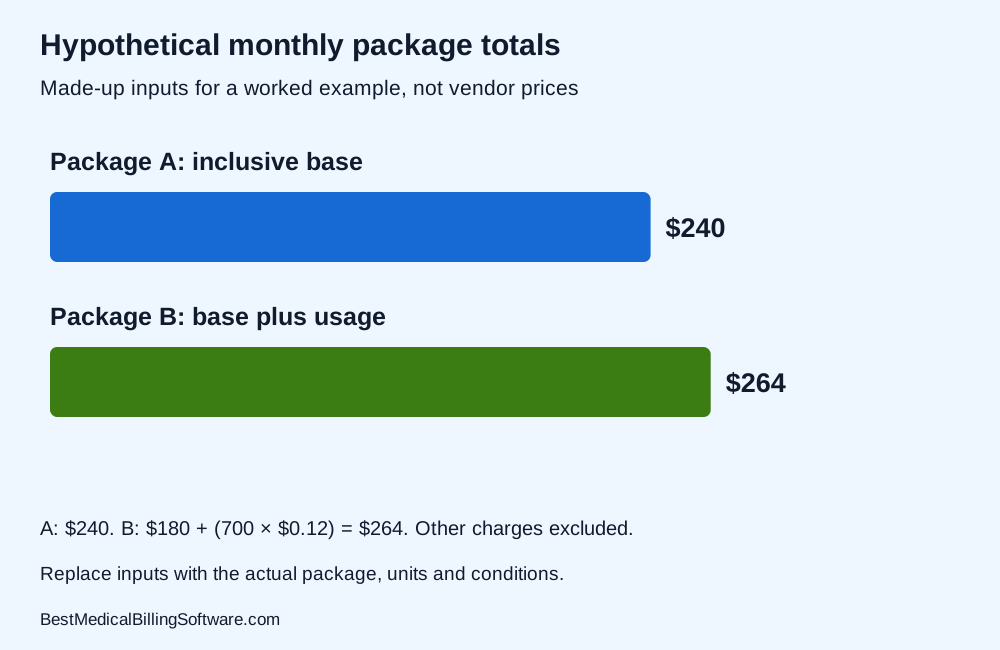
For a hypothetical comparison, Package A has a $240 monthly base and includes the practice’s ordinary electronic claim activity. Package B has a $180 base plus $0.12 for each of 700 billable transactions. The illustrated monthly totals are $240 and $264, before any other services or taxes. These are made-up package assumptions for showing the arithmetic, not vendor offers or market prices. Replace every input with the actual proposed units, allowances and rates before using the worksheet to choose software.
Use medical billing software cost to prepare your next software discussion. Compare billing software prices for your practice with the relevant activity, implementation and retained-work requirements in one brief.
Questions about medical billing software clearinghouse fees
Does a software subscription include every clearinghouse charge?
Ask which transactions and allowances belong in the named package. Compare the subscription with any separately billed eligibility, remittance, paper or other activity relevant to your practice.
Should corrected claims be counted in the estimate?
Describe the correction and resubmission activity your team handles. Ask each company how those events are counted under the proposed billing rules.
Can a higher base price produce a lower total?
It can in a particular comparison when included activity offsets separate charges. Calculate the same workload using each proposed unit and keep all conditions visible.
Choose billing software with clear clearinghouse fees
Choose medical billing software with a clear view of the clearinghouse work your practice buys. Compare included transactions, additional rates and support alongside the subscription. A consistent activity estimate helps your team find a package that fits its actual billing workload.
Compare Software Prices — find software options and compare complete company prices for your practice.
Sources
Product information checked October 16, 2026. Company facts use the first-party references below. Buying examples and any explicitly hypothetical calculations are editorial tools, not vendor offers.
- CollaborateMD package and transaction information: https://www.collaboratemd.com/pricing/
- RXNT modular and suite pricing information: https://www.rxnt.com/pricing/