Solo-Practice Medical Billing Software: Build a First-Year Price Comparison

Build a solo-practice medical billing software budget around the work one practice needs completed and the tools its billing team will actually use. A low monthly headline can leave setup, transactions or retained systems outside the comparison. Put the recurring package and one-time work into the same first-year view, then compare prices using the same provider count, activity and required services.
Compare medical billing software prices for your practice. Describe the billing tools, current systems and support your team needs to make the software comparison useful.
Set the scope for a solo-practice billing software budget
Describe who bills for the practice and which tasks the software should support. Include charge entry, claims, payment posting, follow-up, reporting and patient-balance work where relevant. Identify the EHR, scheduling or payment tools the practice intends to keep. Separate software used by your own team from a service in which another company performs billing work. This gives the price request a clear starting point. Companies can then respond with the package and support that match the practice, rather than a broad offer based only on the fact that it has one clinician.
Ready to explore software options? Compare Software Prices with the required billing work and current systems in the same request. Keep the proposed package and charging basis together when reviewing company responses.
Compare solo-practice subscriptions by the stated billing unit
Ask how the proposed amount is charged: provider, practice, user, encounter or another defined unit. Discuss minimums, included activity and the conditions for any starting price. Keep the package name beside the rate. AdvancedMD describes provider and encounter-based software pricing, while RXNT presents modular and suite choices. Those structures can produce different budget questions for a solo practice. Use the company profiles to review the available models, then request the precise configuration your practice would buy. The comparison needs the relevant unit and scope, not simply the smallest displayed number.
Add setup and retained software to the first-year estimate
List one-time configuration, migration and training work included with each proposal. Add any confirmed amounts for continuing EHR access, interfaces or tools that remain in use. Ask how implementation support works when a staff member needs additional help. Keep optional work separate so you can see the difference between the minimum planned move and a wider package. A useful solo-practice budget shows the complete operating arrangement after the change, including the subscriptions and support relationships your team will continue managing alongside the new billing software.
For the related buying decision, explore medical billing software for solo practices. Then compare medical billing software companies and prices using a consistent description of the practice and the work you want the software to support.
Work through a hypothetical solo-practice software budget
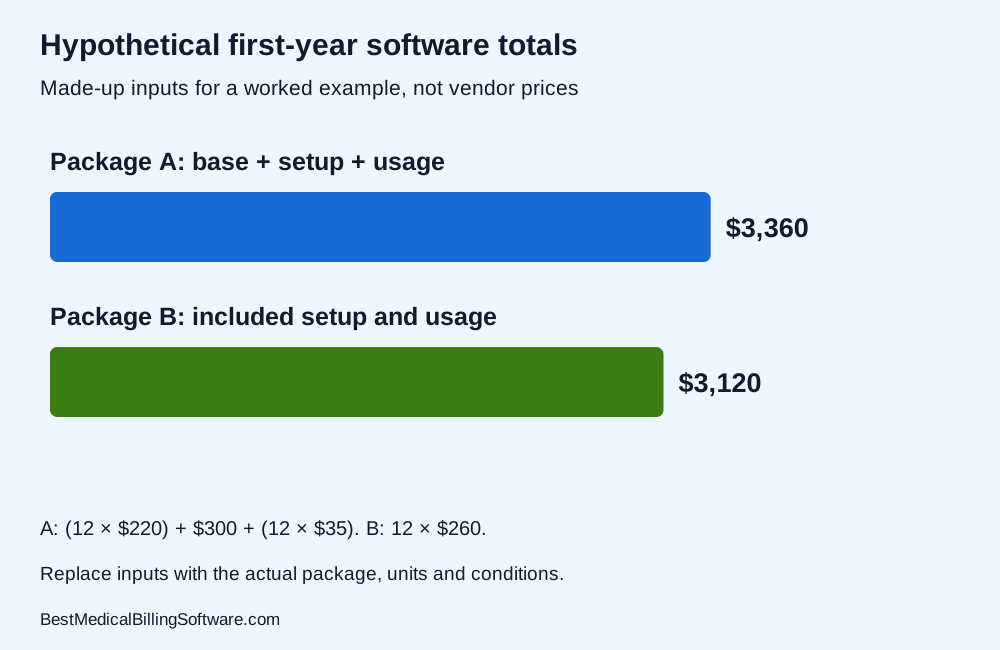
For an arithmetic example only, assume a $220 monthly software package, $300 setup and $35 monthly transaction costs. Twelve months of software is $2,640; transactions add $420; the illustrated first-year total is $3,360. These invented inputs are a worksheet, not any company’s price. A second hypothetical package at $260 monthly with the relevant transactions and setup included totals $3,120 for twelve months. The example shows why the first-year calculation can differ from the base subscription comparison. Replace every amount, inclusion and condition with the actual proposal before using the result.
Solo-practice medical billing software budget comparison checklist
| Compare | Record from the software proposal |
|---|---|
| Required solo-practice billing work | Named package and required workflow |
| Provider/practice/user charging unit | Included work and retained staff task |
| Recurring package and transactions | Exact billing unit and conditions |
| One-time setup and migration | Setup scope and responsible contact |
| Retained systems and support | Support route and ongoing charge |
| First-year and ongoing totals | Complete amount and next question |
Use the checklist when comparing solo-practice medical billing software budget. Put the company response beside each required item so your practice can compare software scope, retained work and complete charges clearly.
Compare ordinary and higher-activity software costs
Give companies the same current workload and a clearly labelled higher-activity scenario. Ask which charges would change and which stay fixed. Include additional users or a change in billing support only when they are part of the practice’s real plans. Keep the calculation tied to the quoted billing unit. The purpose is to understand how the package responds to the workload your practice expects, not to predict a universal growth rate. Review the result with the person who handles billing so the activity description matches the work behind the monthly invoices.
Review AdvancedMD software pricing models for more detail on the company or product involved. Compare Software Prices for the package, interfaces and support your practice wants to buy.
Choose solo-practice software with a usable operating budget
Compare the first-year total, ongoing amount and support your team will receive. Ask whether the required reporting, claim follow-up and patient-balance work are included in the proposed version. Include the time and training needed to use it well. Keep any trade-off clear: one package may include services another prices separately, and the practice should understand those differences before choosing. A useful final comparison gives the owner a clear view of the tools, retained staff work, implementation and charges needed to operate billing during the first year.
Solo-practice medical billing software budget: a practice buying example
A solo practitioner with an office manager may value a familiar EHR and a focused billing change. Another practice may want one integrated platform. Start both comparisons with the same required billing work, then show retained subscriptions under the first option and the broader replacement scope under the second. Use the first-year worksheet to place implementation and recurring charges together. The example helps the practice compare different arrangements without treating them as identical purchases or assuming the lowest monthly base amount provides the best fit.
Use medical billing software pricing to prepare your next software discussion. Compare billing software prices for your practice with the relevant activity, implementation and retained-work requirements in one brief.
Questions about solo-practice medical billing software budget
Are the dollar amounts in the worked budget vendor prices?
No. They are explicit hypothetical inputs for demonstrating the arithmetic. Use current company proposals, included services and conditions in your own budget.
Should a solo practice always choose encounter pricing?
Compare the quoted units and conditions against the practice’s activity and required package. The appropriate result depends on the actual options, not headcount alone.
Why separate first-year and ongoing costs?
Setup, migration or other one-time work can change the first-year total. Showing both periods makes the continuing subscription and the cost of moving easier to compare.
Choose solo-practice software using the first-year budget
Choose solo-practice medical billing software using a complete, readable budget. Compare the billing unit, included work, setup and retained systems together. A consistent first-year calculation helps your practice assess software prices against the support and workflow it wants to buy.
Compare Software Prices — find software options and compare complete company prices for your practice.
Sources
Product information checked October 16, 2026. Company facts use the first-party references below. Buying examples and any explicitly hypothetical calculations are editorial tools, not vendor offers.
- AdvancedMD provider and encounter pricing models: https://www.advancedmd.com/software-pricing/
- RXNT software plan structure: https://www.rxnt.com/pricing/